Ask a Blogger

Thanks to Madame Deals for this weeks post!

I recently attending a meeting to learn how to optimize my site to increase my revenue using Google adsense. I would like to share 5 tips that I believe will help you make pay out each month. It is important to understand that even if you do not have adsense that these tips are valuable and can be applied to any ad network.

1) Content is key. If you do not have content then you will not have traffic. The key to making money off of ads is that the ad is relevant to what you write. If you provide quality content the ad will mirror what your customers/readers are searching for and they will click through your ads. You will also generate more traffic based on the quality of content on your site. You should try to write articles that are relevant and searchable so your page views increase.

2) You need to determine the placement of your ads where do people look. That is where you want to place your ads.This is a great tool if you are on the Genesis Theme on Word Press it will show the layout of your site so you can place your ads for optimization. The reader generally looks to the left and the top of your site. If you have your ads above the fold you will do well.

3) You need to select the ads sizes that have the most inventory. The best ad sizes are 728×90, 320×250, and 160 x600. You will need to make sure you select the ads with both text/images to increase the ads available to appear on your site.

4) You need to use the maximum number of ads per page. You can use 3 ads of any size and 3 link units per page. I also found out that is you use another network that carries Adsense ads those do not count towards your total like Izea or Double Click Networks.

5) Here are some places to sneak in ads. They should appear at the end of your post. You can also place them at the bottom of contests, in your email feed, and one pages that generate a lot of traffic. You need to be mindful of the number of Ads that appear on the site at the same time. The use of the google’s small business DFB will allow you to use the best performing ads at all times. I look forward to trying out this free service. It allows the ad networks I run to bid against one another to determine the highest paying ad to run on my site at any given time. I will let you know how it goes.

I think if you optimize your site you should expect to earn $5.00 for every 1,500 page views. That is usually around my average.

 You can view all our posts by searching Ask a Blogger.

{ 0 comments }

Signature

Disclosure: This post may contain an affiliate link.

Post Divider

Where did my content go?

I’ve asked myself this question more times than I can count.   I have posts.  Many, many posts.   But they are not true content.

I’ve been writing quick deal posts, an occasional giveaway or time consuming store matchups.  Where is the substance?  Where is the advice, recipes and stories that I enjoy writing?

My blog content is in my head.   It is written in a notebook with a few ideas scribbled haphazardly here and there.  It is not on my website where it belongs.

Why?

I realized some time ago that I had lost focus.  I am still blogging about what I love – saving money.  But somewhere along the way I lost my passion.  Not my passion for helping others to save money, but the passion to take the time to sit down and write a good article.

So what happened?

The first answer is simple yet unbelievably complicated.   Life happened.

I was spending so much time blogging that I lost focus of the entire reason I worked from home.  My family.  Are there any bells going off in your head?  Cutting back on blogging to spend more time with my kids “forced” me to try and keep up the post volume in a shorter amount of time. It’s not possible alone, so the content fell by the wayside.  I had intentions.  So many intention to write everyday and it just didn’t happen.

Not to mention that there are so many deals!  I can’t even scratch the surface of what I want to share.  I would need 20 clones to get that much done in a day.  At some point, I’m not exactly sure when;  I started posting only deals.  It’s not that deals are easy to post,  just much faster than writing & editing an entire article.  Plus, most deals are short lived.  They are HOT.  They need to go up right now!

But wait.

How many deal bloggers are out there?  I don’t even know.  A LOT!

I know I’m not the only deal blog people read, so why am I so crazy about getting those deals up?  I honestly don’t know.  Habit?  The little voice in the back of my head that says I do need to contribute money to the family?

One thing I do know for sure is that I need to make a change.  I still WANT to post deals.  I still WANT to include the store matchups.

I NEED to get my content back.

There is also a bonus to adding content back on my site.  Adding strong, beneficial content will help with my SEO.  And that should help satisfy the little green voice in my head.

And it starts now (I hope).  I’ve spent about 20 minutes getting my article into first draft.  Now I need to run off to preschool pickup and keep my figures crossed that I’ll actually complete the editing process this evening….

Do you need to get your content back?

You can view all our posts by searching Ask a Blogger.

{ 2 comments }

Signature

Disclosure: This post may contain an affiliate link.

Post Divider

Thanks to Madame Deals for this weeks post!

The question of the hour is when do you mark a post as a “no follow post?”


The answer is simple.  If Goggle thinks you are making money on the post then it is a “No Follow” link.  This would include reviews, giveaways, and affiliates links.  If you created a post that you are going to duplicate then mark it as a no follow post. Goggle does not like posts that have duplicate content, so you need to alert their bots that this content is not being submitted for review. If you fail to mark your posts with no follows;  you may adversely affect you Google page rank. It is important to be transparent with Google if you were paid or could get paid, so mark it is a no follow.

You can view all our posts by searching Ask a Blogger.

{ 0 comments }

Signature

Disclosure: This post may contain an affiliate link.

Post Divider

A fellow blogger asked me a question yesterday that I thought others might run across as well. The question arose from a requirement set forth in the terms for a sponsored post.

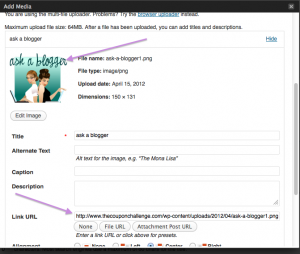
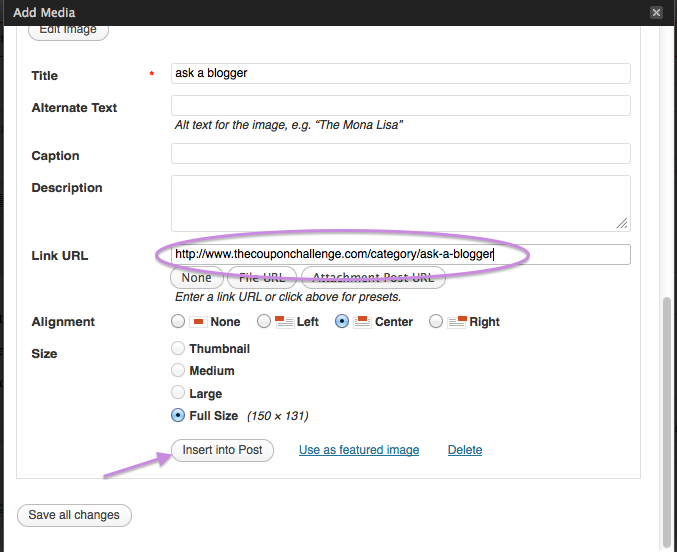
How do you make an image click through to a specific URL?


1.  Add the image into your Post Editor.

2.  Look for the Link URL and change it to your desired URL.

3.  Click to “Insert into Post.”

4.  Preview your post and test the link to verify the URL is directing correctly.

It’s that easy!

I’ve been required to change the image URL in a sponsored post using the required campaign image.  I would NOT change the image URL of a photo that I owned the rights to and have it be directed away from my page to a sponsors page.

You can view all our posts by searching Ask a Blogger.


{ 0 comments }

Signature

Disclosure: This post may contain an affiliate link.

Post Divider

Thanks to Amee with Madame Deals for this weeks post:

I love this site Pingdom.com. It will send you an alert when your site is down. I can’t tell you how many times I have needed this feature. It also has a variety of other tools that are useful for site management. One that is especially helpful is figuring out what on your site is redirecting.

Click on run a report

If you see an arrow then your site is redirecting. I have installed the plug-in Broken Link Checker it lets you know which links are broken so you can fix them. If you do not want to install a plug-in then you can go to Free Broken Link Checker . You will then need to go into each link and fix it.

These tools help you to figure out information quickly prior to having issues. You will need to fix these errors so that you do not limited your resources. You also do not want to have your readers have a poor user experience because they can’t find one of your posts.

From Dana:  I also use Pingdom to get an email if my site is down.  Even when I’m not online, I can be alerted to an issue on my website.   Google Webmaster tools is also a great way to find Crawl Errors, broken links and more information to help your site run smoothly.

You can view all our posts by searching Ask a Blogger.

{ 0 comments }

Signature

Disclosure: This post may contain an affiliate link.

Post Divider

I was thinking about some of the comments my fellow bloggers receive on their blogs and Facebook pages.  Honestly, some of the comments I’ve read on other sites shock me!

What do you do if you get a negative comment on your blog or Facebook page?  Do you delete it?  Do you leave it?

Personally, I believe that everyone has the right to express their opinions.  I encourage readers to comment on posts and share their thoughts.  I’m okay with someone disagreeing with me or telling me I made an error or don’t like  product. However, I will delete a comment that uses inappropriate language or is disrespectful to me or another reader.

That said, I rarely delete comments on my site.   I’ve been fortunate that I haven’t needed to delete comments on more than a few occasions.  Bottom line – feel free to express your opinions, just use your “big girl words.”

I’m curious.  Do you delete negative comments?

You can view all our posts by searching Ask a Blogger.

{ 3 comments }

Signature

Disclosure: This post may contain an affiliate link.

Post Divider

Ask a Blogger: Know to Keep up with Affiliate Companies

March 11, 2012

Thanks to Amee with Madame Deals for this weeks post. How do you stay on top of all those affiliate companies. The answer is that in itself is a full-time job. The other answer is to not use more than four or five on a regular basis. I place my earnings in an excel spreadsheet [...]

Read the full article →

Ask a Blogger: LLC/S-Corp Tax Filing Status Explained

March 4, 2012

Blogging is a business and needs to be treated as such when considering taxes and liability. We can post all day about Blogging Tips & How to Make Money Blogging but at the end of the day, you better be on top of your taxes. There is a lot of confusion surrounding LLC and S-Corps, [...]

Read the full article →

Ask a Blogger: How to Set Up a Facebook Pinterest Tab

February 26, 2012

Pinterest is all the rage right now.  Showing off your pics can help get traffic to your site and in turn, potentially increase your revenue. Adding a Pinterest Tab to your Facebook Page can help get your Pinterest Page in front of your fans and hopefully, get them repining your photos. How to Set Up [...]

Read the full article →

Ask a Blogger: Where’s Your Blog Button?

February 19, 2012

Thanks to Amee with Madame Deals for writing this weeks Ask a Blogger Post! Where is your blog button? Why isn’t it on your front page. The reason is simple – you are on my site why do you need my button? The truth is my reader whom my site is created for does not [...]

Read the full article →
MyFreeCopyright.com Registered & Protected